#The Problem
Let's say we're designing an image upload service — think Instagram, Facebook, or any product where users upload photos at scale.
Requirement: Support millions of photo uploads per day.
Before jumping into a solution, it helps to brainstorm along a few axes that show up in almost every system design problem:
- Storage — where do the actual bytes live?
- Data flow — how does an image move from a user's phone to storage to a viewer's screen?
- Separation of concerns — should "images" and "posts" be the same thing?
- Privacy — can anyone view any image if they guess the URL?
- Extensibility / optimization — what happens when we need multiple resolutions, formats, or a new CDN?
#The Naive Approach (and why it's wrong)
The instinctive design looks like this: the client sends the image file to your backend, your backend server writes it to S3 (or GCS), and returns a URL.
The problem is bandwidth and compute. Every single image now has to physically pass through your application servers before it reaches storage. At scale — millions of uploads a day — this means:
- You're paying for bandwidth twice (client → server, server → S3).
- Your app servers spend CPU and memory buffering large binary payloads instead of doing actual business logic.
- Your upload service becomes a bottleneck and a single point of failure for something that doesn't need business logic at all.
#The Solution: Presigned URLs
The key idea: let the client upload directly to blob storage (S3/GCS), and keep your backend completely out of the data path.
This is done using a presigned URL — a special, time-limited URL that S3 generates, which grants temporary permission to upload (or read) a specific object at a specific path, without requiring the caller to have AWS credentials.
#The Flow
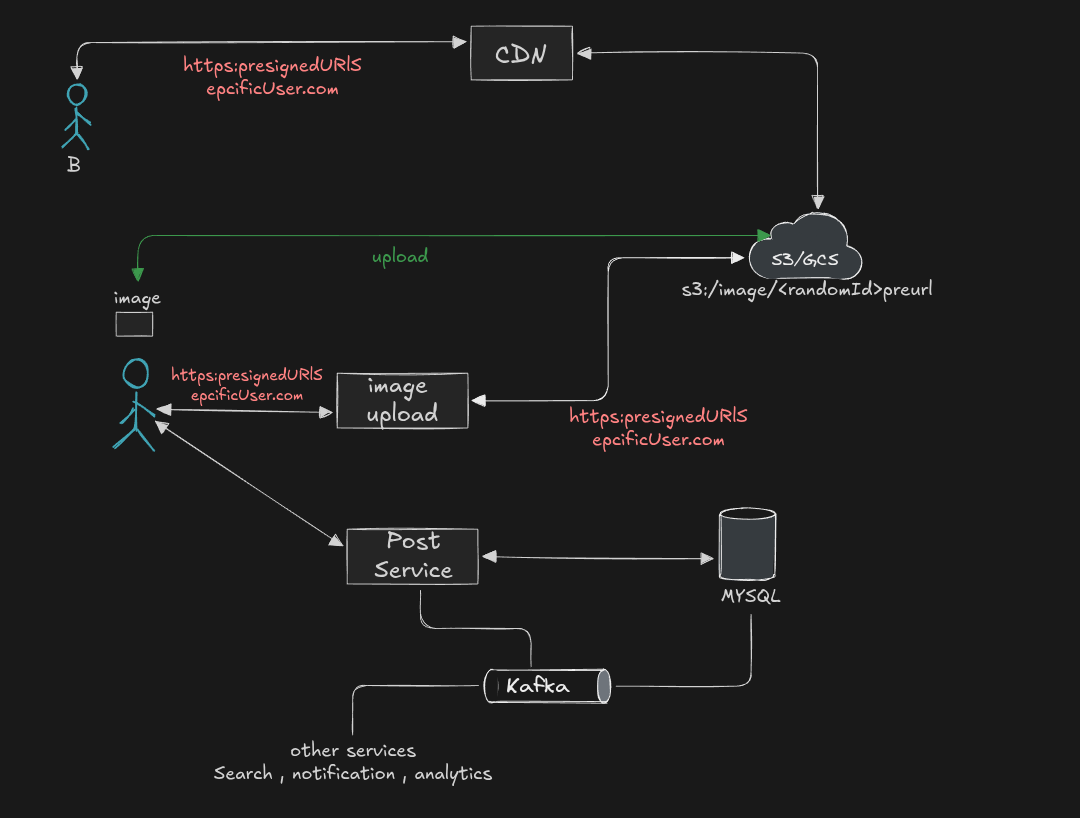
- Client requests an upload — it tells the Image Upload Service, "I want to upload a photo."
- Service generates a random Image ID — e.g.
8a7c2f.... This becomes the object key in storage:s3://images/8a7c2f.jpg. - Service asks the S3 SDK to generate a presigned URL for that exact path, with a short expiry (e.g. 5 minutes):
s3.generatePresignedUrl({
  bucket: "images",
  key: "8a7c2f.jpg",
  expires: 300, // 5 minutes
});
- Service returns the presigned URL to the client.
- Client uploads directly to S3 using a
PUTrequest against that URL — the image bytes never touch your servers. - S3 stores the object at
images/8a7c2f.jpg.
That's it. Your image upload service never sees a single byte of the image. All it did was generate an ID and ask S3 for permission on the client's behalf. This is exactly how GitHub handles large file uploads, and it's the pattern almost every major product uses.
#Designing the Post Table (and a core system design principle)
Here's where most people get it wrong on the first try. The instinctive schema for a Post looks like this:
Post: user_id, caption, url
Looks reasonable — until you ask: what exactly do you store in url?
- Do you store the raw S3 URL?
- Do you store the CDN URL?
Say you store the CDN URL because that's what gets served to users. Now imagine you're Instagram, and you're using Cloudflare as your CDN. Facebook acquires you, and a year later, leadership decides to migrate everyone onto Facebook's own CDN infrastructure instead of Cloudflare.
Now every single row in your posts table — potentially billions of rows — has a URL baked in with the old CDN's domain and query-parameter format. You'd need a massive backfill migration just to change infrastructure providers. Same problem if you ever switch cloud storage providers (S3 → GCS, for example).
#The principle
If something is derivable, don't store it.
A URL is derivable from two pieces of information you already have: the user_id (or image_id) and your current CDN/provider configuration. So don't store the URL — store the raw facts, and treat "URL generation" as a piece of business logic (a function), not as data.
Post: post_id, user_id, image_id, caption
At render/request time, you generate the URL:
function getImageUrl(imageId) {
  return `https://${CDN_DOMAIN}/${imageId}`;
}
Now, changing CDN providers or storage backends is a one-line config change — not a database migration. This is a broader idea worth internalizing: whenever you're structuring a system, avoid permanently binding yourself to a decision (a vendor, a URL format, a schema shape) that you might need to change later. Store the crux of the information, and keep everything derivable out of the database.
#Separation of Concerns: Image Service vs. Post Service
Putting it all together, the end-to-end flow looks like this:
- User wants to upload an image → talks to the Image Service.
- Image Service prepares the upload by generating a presigned URL (the flow described above).
- Client uploads the image directly to S3.
- Once the upload completes, the client calls the Post Service to create a post entry, passing along the
image_id. - Post Service writes the post (with
image_id, not a URL) to its database (e.g. MySQL).
Notice that the Image Service and Post Service are two separate services, connected only by an image_id. This separation is important, and not just for its own sake:
- Instagram isn't "just photos." The same underlying image-handling concept — generate ID, get presigned URL, upload directly to storage — needs to work for Reels, Stories, and regular posts. If "image" and "post" logic were fused together, you'd have to duplicate (or awkwardly overload) that logic for every new content type.
- With separation of concerns, a
Reels Upload ServiceorStories Servicecan reuse the exact same Image Service without knowing anything about how posts work, and vice versa.
#Fanning out to other services via CDC + Kafka
Once a post is created in MySQL, other services in the system — Search, Notifications, Analytics — often need to know about it too. Rather than the Post Service directly calling each of these services synchronously (which tightly couples them and creates cascading failure risk), a common pattern is:
- Use CDC (Change Data Capture) to stream row-level changes out of the Post Service's MySQL database.
- Publish those changes onto a Kafka topic.
- Downstream services (Search, Notifications, Analytics, etc.) subscribe to the topic independently and process events at their own pace.
This keeps the Post Service simple — it only has to write to its own database, and everything else reacts asynchronously.
Discussion question: what would be a good partition key for this Kafka topic? Something like
user_idis a reasonable candidate — it keeps all events for a given user ordered and processed by the same partition/consumer, which matters for feeds and notifications ordering.
#Privacy: Are Private Photos Actually Private?
Not by default — and this is a subtlety a lot of people miss.
Anyone who has the direct URL to an image object could technically fetch it, unless you gate access. This is where signed URLs with a timed signature come in — not just for uploads, but for reads too.
A real "private" photo URL looks something like:
https://instacdn.net/ul/123880123.jpg?ig_cache_key=...&signature=...&expires=...
Here's how it works end to end:
- When an
<img>tag on the page requests this URL, the request goes to the CDN. - The CDN validates the request using the attached signature and expiry parameters.
- If the signature is valid and hasn't expired, the CDN returns the image.
- If it's invalid or expired, the CDN returns an error instead of the image.
This means image URLs for private content aren't static, permanent links — they're time-boxed, signed tokens that are regenerated on each request (typically at render/API-response time), so an old leaked URL naturally stops working.
#Image Optimization: Don't Build It Yourself
A tempting next step is to build your own image-resizing/optimization microservice — something that takes an uploaded photo and generates multiple resolutions for different devices.
Don't. This is a solved problem, and virtually every modern CDN provides on-the-fly image optimization out of the box, because serving images and video efficiently is one of the most common CDN use cases.
#Why this matters
Users differ across:
- Geography and network bandwidth
- Device type and screen size
- Processing power
Sending a 5MB original photo (uploaded by a celebrity, say) to every single follower — regardless of whether they're on a high-end phone on Wi-Fi or a budget phone on 3G — is wasteful and slow. Different users need different resolutions of the same photo.
#The CDN-native solution
Most CDNs accept query parameters that control image processing at request time. A common one is w (width):
https://instacdn.net/ul/1789_4275.jpg?w=360
If the original image is 1000px wide but the requesting device's screen is only 360px, the CDN resizes it on the fly and serves a 360px version — no separate resizing pipeline required on your end.
In practice, the frontend is what appends this parameter, because the frontend knows the actual screen/viewport dimensions of the device it's running on. The backend just returns the base image URL; the frontend appends ?w=<screen_width> (or similar) before rendering.
This same mechanism composes with the private/signed URL scheme above — the CDN can validate a signature and apply resizing in the same request.
#Putting It All Together
The overall design rests on a small number of ideas that generalize well beyond image uploads:
- Keep large binary payloads out of your application servers — use presigned URLs so clients talk directly to blob storage.
- Never store what you can derive — URLs, formats, and provider-specific paths should be computed by business logic, not persisted as data.
- Separate concerns into independent services (Image, Post, Reels, Stories) connected by lightweight IDs, so each can evolve independently.
- Decouple downstream consumers (Search, Notifications, Analytics) using CDC + a message broker like Kafka, instead of direct synchronous calls.
- Use signed, time-limited URLs for both uploads and reads to enforce privacy without building a custom auth-per-image system.
- Lean on your CDN for image optimization — resizing, format conversion, and compression are commodity features you shouldn't rebuild.
None of these ideas are unique to "image upload services" — they show up again and again in distributed systems design. Once you internalize "if it's derivable, don't store it" and "keep bulky I/O out of your critical path," you'll start seeing this pattern everywhere.